
Semaphore CI
At CaterCow, we rely on Semaphore CI to automate everything from testing to deploying our applications across all platforms and environments. This powerful, flexible CI/CD platform has become an integral part of our development workflow. Here’s a detailed look at how and why we use Semaphore.
How We Use Semaphore CI
Our development process is built around a robust CI/CD pipeline that handles deployments, automated testing, and even occasional one-off tasks.
Deployments
We manage deployments for our entire infrastructure through Semaphore. This includes:
- Production Environment: Our
production-deploy.ymlpipeline file automates the deployment process to our production Kubernetes cluster. It uses a.semaphore/kube_deploy.shscript that executes ahelm upgrade, ensuring our applications are updated smoothly and reliably. - Staging and QA Environments: Before code reaches production, it goes through various other environments. Our
staging-deploy.ymlpipeline runs only on themasterbranch and deploys to our staging environment. It uses the exact same.semaphore/kube_deploy.shscript as our production pipeline, ensuring consistency across environments. The deployment target is controlled simply by setting environment variables likeKUBE_NAMESPACEtostagingandMAIN_HOSTtostaging.catercow.com. Our main build pipeline also includes parameterized promotions to deploy to QA environments. - Mobile and Web Apps: We even trigger our Expo mobile app builds and deployments using Semaphore. The
expo-native-deploy.ymlfile defines the process for building and submitting our native applications, while another build job in our main pipeline handles building the web version, which is deployed alongside all our other web services.
Automated Testing
To maintain code quality and stability, we run a comprehensive suite of automated tests. The tests.yml pipeline is automatically triggered after our build pipeline succeeds on non-master branches. This pipeline fans out to run multiple test suites in parallel, providing fast feedback to our developers. Our testing stages include:
- Integration Tests: These run on a more powerful
e2-standard-4machine and use Playwright to test the application from an end-user's perspective. These tests are sharded and run in parallel to reduce execution time. - Ruby Unit Tests: We have broken our Rspec tests into multiple jobs (Requests, Commanders, Other) that run in parallel to reduce execution time.
- Jest Unit Tests: Our frontend JavaScript code is also covered by its own set of unit tests running with Jest.
Why We Chose Semaphore CI
Semaphore's design philosophy aligns perfectly with our needs, offering a blend of power, simplicity, and flexibility.
Speed and Simplicity
One of the biggest advantages of Semaphore is that it runs jobs directly on fast Linux virtual machines. This, combined with powerful caching for dependencies (cache store and cache restore are used throughout our configurations), dramatically reduces our build and test times.
We also appreciate that Semaphore's configuration is built on basic shell scripting. Instead of being locked into a proprietary DSL, our core CI logic resides in simple .sh files like docker_utils.sh and kube_deploy.sh. This makes our setup portable and easy to reason about for any developer familiar with the command line. Semaphore augments this with useful helpers for common tasks like checking out the repository (checkout) and managing secrets.
Powerful Pipeline Orchestration
Semaphore's model of pipelines and promotions allows us to create sophisticated, gated workflows.
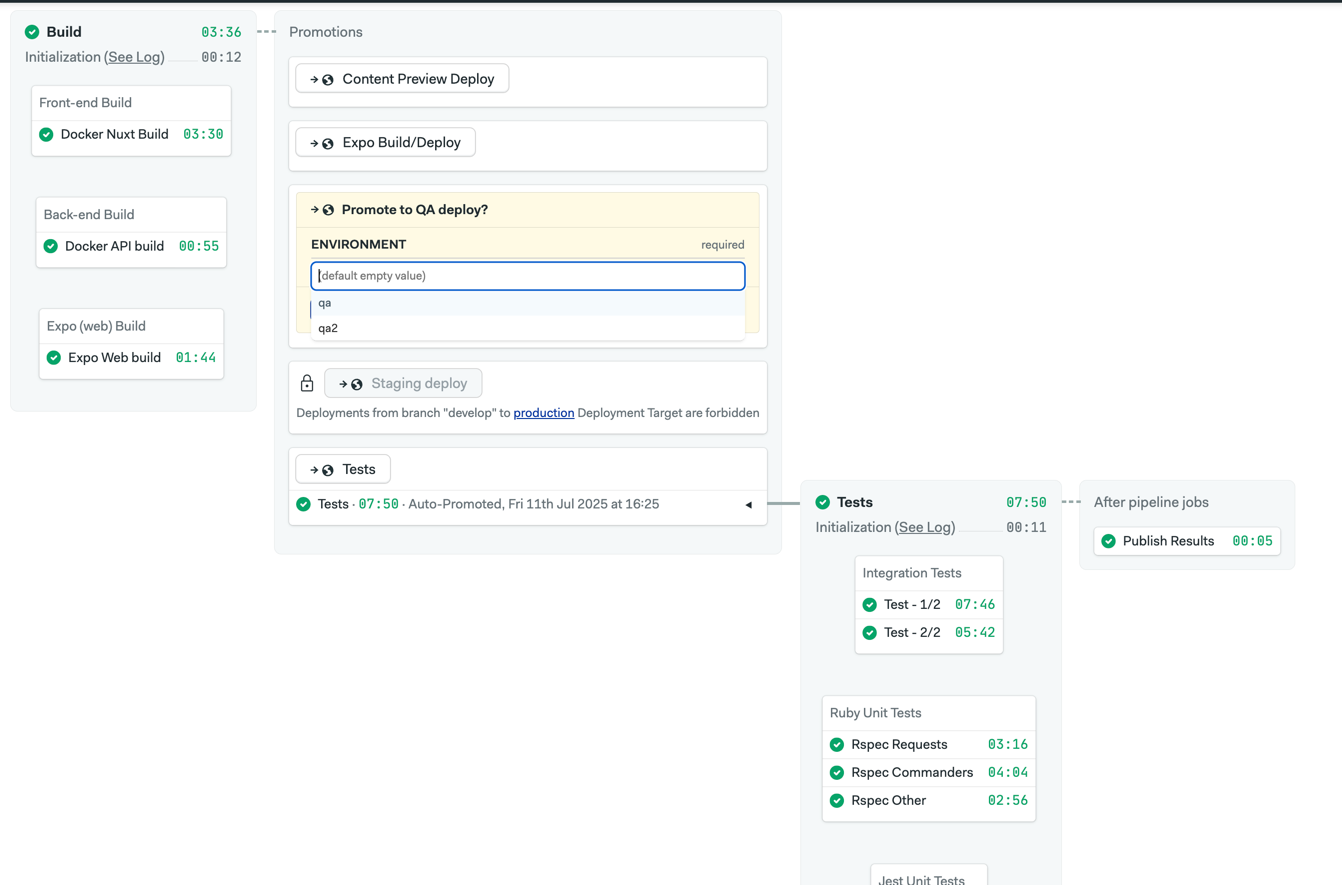
Fan-in/Fan-out Pipelines: Our primary
semaphore.ymlpipeline is an example of a "fan-out" workflow. It kicks off parallel blocks to build our frontend, backend, and Expo web components simultaneously. Once these are complete, it "fans-in" to a set of promotions that can trigger subsequent pipelines for testing or deployment.Flexible Promotions: We use a mix of automatic and manual promotions to create a controlled path to production. A successful build on the
masterbranch automatically promotes to a staging deployment. After verification in the staging environment, thestaging-deploy.ymlpipeline provides a manual promotion to trigger the final production deployment. This creates a clear, gated release process. We also use parameterized promotions for tasks like deploying to a specific QA environment:promotions: - name: QA deploy pipeline_file: qa-deploy.yml parameters: env_vars: - required: true options: - qa - qa2 description: Where to deploy? name: ENVIRONMENT
This combination of features gives us a CI/CD platform that is not only fast and efficient but also highly adaptable to the evolving needs of our engineering team.