
Menus
CaterCow Marketplace: Menu & Offerings Data Models
Overview
This document outlines the data models that power the restaurant menus on the CaterCow marketplace. The system is designed to be highly flexible, supporting extensive customization of menu items to accommodate the diverse and complex offerings of our restaurant partners.
The primary components of this system are:
- Restaurant Menus (
restaurant_menus): The top-level container for a specific menu (e.g., "Lunch Menu", "Holiday Menu"). - Menu Items (
menu_items): The individual dishes or products a customer can order. These also serve as the options within a customization. - Modifier Groups (
modifier_groups): Logical collections ofmenu_itemsthat can be used to customize a parent menu item (e.g., a "Choose Your Protein" group would containmenu_itemslike "Chicken", "Beef", and "Tofu"). - Menu Item Modifiers (
menu_item_modifiers): The join table that establishes the rules for how amodifier_groupapplies to a parentmenu_item(e.g., must choose 1, may choose up to 3).
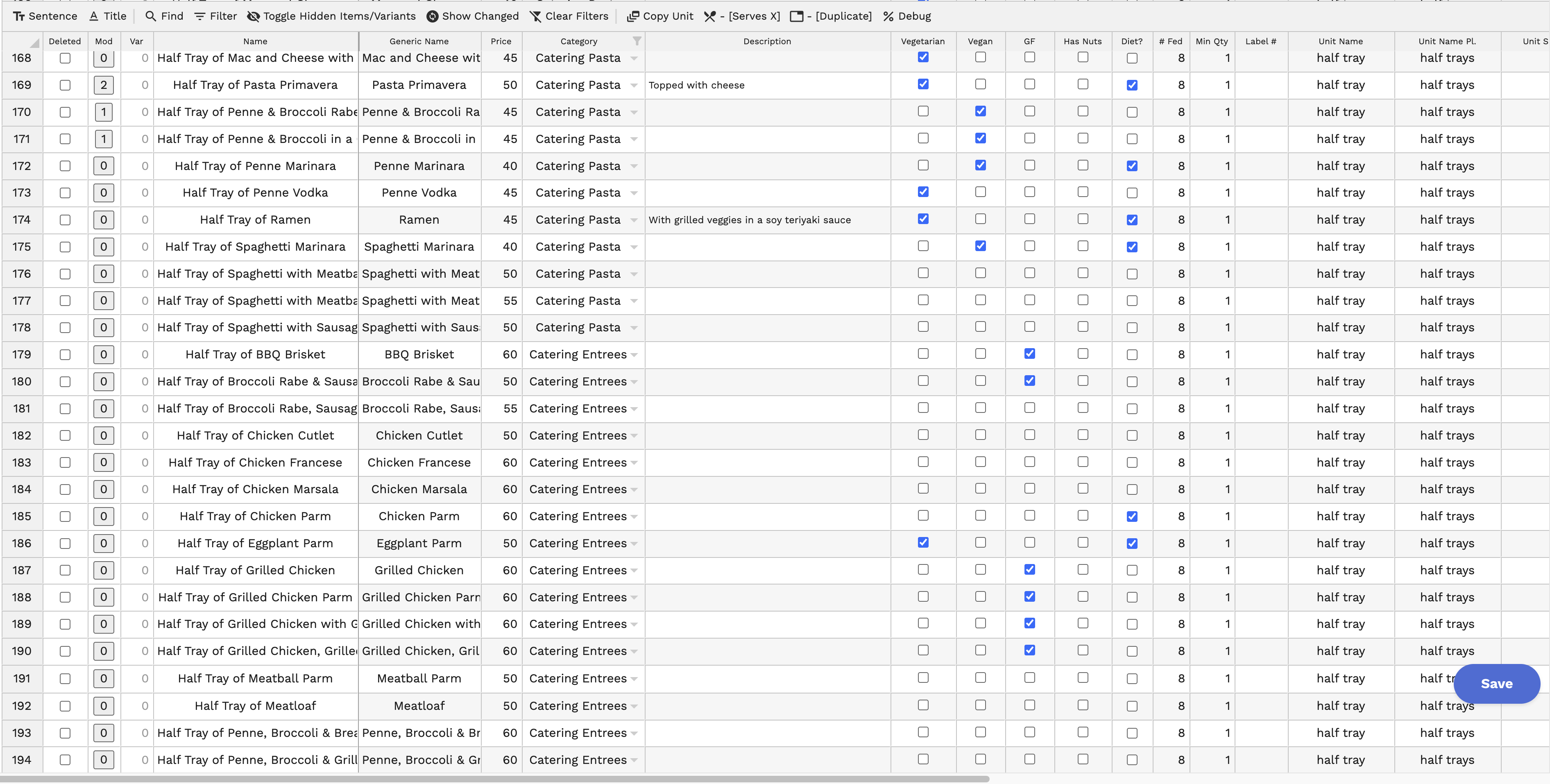
Menus are primarily ingested into our system via a Woflow webhook. This process parses a proprietary JSON format from Woflow and translates it into the CaterCow schema detailed below. Post-ingestion, menus are managed internally by admins using a customized Jspreadsheet interface, which allows for efficient bulk editing.
Entity-Relationship Diagram (ERD)
The following diagram illustrates the relationships between the core tables in the menu system.
Model & Schema Breakdown
restaurant_menus
This is the highest-level container, representing a complete menu for a brand. A brand can have multiple menus, such as a seasonal menu, a breakfast menu, and a standard lunch menu.
| Column Name | Type | Description |
|---|---|---|
id | bigint | Primary Key. |
brand_id | bigint | Foreign Key linking to the brands table. |
name | varchar | The display name of the menu (e.g., "Main Lunch Menu"). |
active | boolean | A boolean flag to determine if the menu is currently live on the marketplace. |
active_changed_at | datetime | Timestamp for when the active status was last changed. |
menu_items_updated_at | datetime | Timestamp for the last update to any item within this menu, used for caching. |
rigorously_vetted_at | datetime | Timestamp indicating if/when the menu passed a rigorous internal review. |
menu_categories
Categories are used to organize menu_items within a restaurant_menu (e.g., "Appetizers", "Main Courses", "Desserts", "Drinks").
| Column Name | Type | Description |
|---|---|---|
id | bigint | Primary Key. |
restaurant_menu_id | bigint | Foreign Key linking to the restaurant_menus table. |
name | varchar | The name of the category (e.g., "Vegan Pizzas"). |
description | text | An optional description for the category. |
hidden | boolean | A boolean flag to hide the category from the customer-facing menu. |
pollable | boolean | Important for Group Ordering. If true, items in this category are eligible for group orders. |
menu_items
This is the core table representing an individual, orderable item. It contains all essential information about a dish, including pricing, dietary flags, and serving details. Importantly, menu_items can also function as the selectable options within a modifier_group.
| Column Name | Type | Description |
|---|---|---|
id | bigint | Primary Key. |
restaurant_menu_id | bigint | Foreign Key linking to the parent restaurant_menus table. |
menu_category_id | bigint | Foreign Key linking to the parent menu_categories table. |
name | varchar | The display name of the item. |
description | text | A detailed description of the item. |
price | decimal | The base price of the item. |
qty_served | int | The number of people/units the item serves (e.g., a tray serving 10 people would have qty_served: 10). This is often parsed from the item name/description on import. |
unit_serving | varchar | A description of the serving unit (e.g., "12 ounce can", "6 slices"). |
source_item_id | bigint | Foreign Key to another menu_items record. This is used for item variants. For example, "Half-Tray of Beef" and "Full Tray of Beef" would be separate menu_items, but they would both point to the "Single Serving of Beef" source_item_id as the default or base variant. This allows modifiers to be applied at different price points while still retaining the relationship among variants. |
vegetarian, vegan, etc. | boolean | Boolean flags for dietary information. |
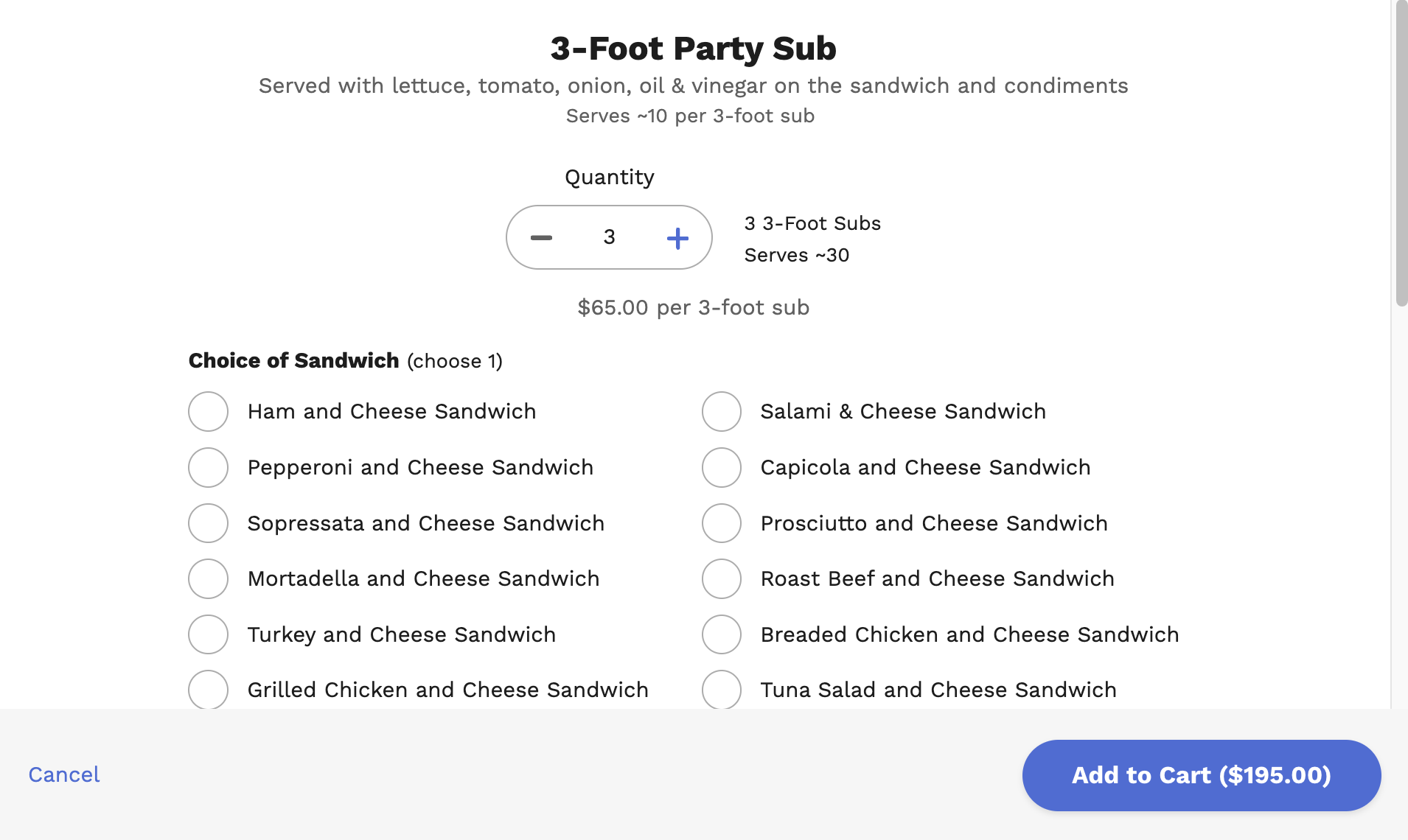
modifiers_json | json | A pre-computed, denormalized JSON blob containing all associated modifier groups and their options. This field is synced every minute and persisted directly to the menu_items table. This approach is critical for performance, as it allows a fully orderable menu item to be displayed without executing complex database joins on-the-fly. It is also copied into order_items and poll_options to retain historical state and proper versioning. |
from_import | boolean | A flag indicating if the item was created via the Woflow import process. |
Example Menu Item:
This example shows a "Specialty 3-Foot Party Sub" which has a complex set of modifiers. The modifiers_json field contains an array of modifier groups, such as "Choice of Sandwich", with all its available options (which are other menu_items) pre-loaded.
{
  "id": 129285,
  "active": false,
  "name": "Specialty 3-Foot Party Sub",
  "description": null,
  "price": "75.0",
  "qty_served": 10,
  "unit_serving": null,
  "menu_category_id": 11061,
  "vegan": true,
  "modifiers_json": [
    {
      "id": 39089,
      "name": "Choice of Sandwich",
      "minimum_choosable_options": 1,
      "maximum_choosable_options": 1,
      "child_items": [
        { "id": 129109, "name": "The Greek", "price": "0.0", "vegetarian": true, "...": "..." },
        { "id": 129110, "name": "The Zohan", "price": "0.0", "vegan": true, "...": "..." },
        { "id": 129114, "name": "The Nothing Worse than Wasted Italian", "price": "0.0", "...": "..." }
      ]
    }
  ]
}
modifier_groups & menu_item_modifiers
These tables work together to handle item customizations. The options presented within a modifier_group are simply other menu_items. The menu_item_modifiers table defines the rules of engagement between the parent item and the option group. For simplicity, modifier groups are not nested (i.e., they are only one layer deep).
modifier_groups: Defines a logical grouping of choices.
- Example: A modifier group could be named "Select Your Protein" or "Choose Your Size". Its selectable options would be other
menu_items, like "Grilled Chicken," "Crispy Tofu," "Small," or "Large." - Deduplication: When importing from Woflow, the system attempts to deduplicate modifier groups that are identical across multiple items to simplify admin management.
menu_item_modifiers: This is the join table that defines the rules for how a modifier_group applies to a parent menu_item. It does not store the options themselves.
| Column Name | Type | Description |
|---|---|---|
id | bigint | Primary Key. |
menu_item_id | bigint | The parent item being modified. |
modifier_group_id | bigint | The group of modifiers this rule applies to. |
minimum_choosable_options | boolean | The minimum number of options that must be selected (e.g., 1 for "Choose Your Protein"). |
maximum_choosable_options | boolean | The maximum number of options allowed (e.g., 3 for "Choose up to 3 toppings"). |
maximum_pollable_options | int | Crucial for Group Ordering. Limits the number of options from this group displayed in a group order. default options are prioritized. |
duplicate_increment | boolean | If not NULL, this indicates the modifier group should be displayed as a series of steppers. The value of this field determines the step of the stepper. This avoids duplicating a modifier group multiple times (e.g., allowing a user to choose any combination of flavors for a dozen bagels). |
Menu Management & Approval Workflow
Admins do not typically interact with these models via a standard form-based UI. Instead, they use a heavily customized Jspreadsheet instance. This spreadsheet-like interface allows for rapid, bulk updates to menu items, prices, dietary flags, and other fields across an entire menu without needing to save each item individually.
Editing and Approval Process
Restaurants have the ability to edit their own menu items. However, to maintain quality and consistency on the marketplace, a manual approval process is in place for any brand that is live on the marketplace!
- Marketplace Partners: When a restaurant that is active on the marketplace makes changes to their menu, these edits are staged. They do not go live immediately. Instead, they enter an approval queue for the CaterCow team to review.
- Non-Marketplace Partners: Restaurants not yet live on the marketplace can edit their menus freely without an approval step.
- Quality Control: This approval workflow serves as a crucial quality control gate. At a certain scale, these controls may be adjusted or automated.
Group Ordering ("Polls") Functionality
A key feature of the CaterCow platform is group ordering, or "polls." This system allows an organizer to send a menu to a group and have each individual select their own meal. To keep these large, complex orders manageable for restaurant kitchens, several constraints are built into the data model.
Group Order Eligibility & Limits
- Category Eligibility: A menu item is only "pollable" if its parent
menu_categoryhas thepollableflag set totrue. - Brand-Level Category Limit: The
brandstable contains apollable_category_limitfield. This integer limits how many distinct pollable categories can be included in a single group order for that brand.- Purpose: Prevents an order for 80 people from including items from 10 different categories (e.g., salads, sandwiches, pizzas, pastas), which would be operationally difficult for a kitchen to prepare simultaneously.
- Modifier-Level Option Limit: The
menu_item_modifierstable has amaximum_pollable_optionsfield. This limits how many choices are displayed for a specific modifier within a group order.- Example: A "Choose Your Sandwich" modifier group might have 30 different sandwich options on the main menu. For a group order, the restaurant may want to limit this to their 5 most popular options to avoid preparing dozens of unique sandwich types. The
maximum_pollable_optionswould be set to5. - Prioritization: The system prioritizes options marked as
defaultto be included in the group order. If there are no defaults, the selection of which options to display is nondeterministic.
- Example: A "Choose Your Sandwich" modifier group might have 30 different sandwich options on the main menu. For a group order, the restaurant may want to limit this to their 5 most popular options to avoid preparing dozens of unique sandwich types. The